Friday, September 2, 2011

Flex :: Metadata tag - Array Element Type

In ActionScript language whenever we define an Array variable, we never specify data type of elements that Array will hold.

To allow Flex compiler to perform type checking on Array elements, we can use [ArrayElementType] metadata tag. This metadata tag allow us to specify data type of Array element.

The tag has following syntax:

[ArrayElementType("elementType")]

The property elementType of [ArrayElementType] metadata tag specifies the data type of Array elements, and can be one of the ActionScript data types, such as String, Number, uint, class or interface.

Incase of user defined class, fully qualified class name, including package detail is expected.

For Example:

....

<fx:Script>
<[!CDATA[
   [ArrayElementType("String"]
   public var strProp:Array;

   [ArrayElementType("myPackage.valueObject.data"]
   public var dataProp:Array;
...
]]>
</fx:Script>

....

Note: The MXML complier checks for proper usage of the Array elements only in MXML code; it does not checks Array usage in ActionScript code.

Tuesday, August 30, 2011

Flex Component Life Cycle

A flex component life cycle can be broadly compartmentalized into three distinct stages:

  1. Initialization
  2. Updating
  3. Destruction

This three stage bundles Six main phases of flex component life cycle which are

  1. Construction
  2. Addition
  3. Initialization
  4. Invalidation
  5. Validation
  6. Removal

Following diagram shows the association of 7 different phase to their respective lifecycle stage

Description of Life Cycle Phases

Stage 1: Initialization

Phase 1: Construction

Construction phase is very first phase of component and is triggered when component is instantiated.  For an example

var myComponent:CustomComponent = new CustomComponent();

It should be noted that constructor should perform minimalist operation. Constructor should be zero argument constructors.

Phase 2: Addition

Addition phase of component is triggered when component is added to a parent component.

this.addChild( myComponent );

The process of adding component to its parent component execute large amount of code. This is the phase where life cycle of component actually gets started.  In granularity addChild method is further divided in to three method addingChild, $addChild and childAdded method.

The addingchild method initialize parent and document reference for component child object. Also it performs style propagation and management for the component.

The $addChild method actually add component to the display list.

The childAdded method calls initialize method on the child.

Phase 3: Initialize

Initialize phase is triggered by childAdded method of Addition phase of component. The initialize method is future broken down into four sub-methods createChildren, childrenCreated, initializeAccessibility and initializationComplete. When initialize method of the component is called first FlextEvent.PREINITIALIZE event is dispatch first and then createChildren method is called.

The createChildren method is responsible for create any extended component and then adding that child component.

The childrenCreated method is responsible for enabling first Invalidate-Validate cycle of flex component life cycle.

The initializeAccessibility method is responsible to configure the component to use flash player accessibility system.

The initializationComplete method is responsible for dispatching FlexEvent.INITIALIZED event. This method marks end of Stage 1 of Flex Component Life cycle.


Stage 2: Updating

Phase 4: Invalidation

Invalidation is the first phase of flex component life cycle that gets repeated throughout the life of the component.  Invalidation phase consist of three method invalidateProperties, invalidateSize and invalidateDisplayList

The invalidateProperties method is called whenever component property is changed and that require before component to re-measure and laid out.

The invalidateSize method is called whenever some action i.e. changes in property or user action which requires the components to re-calculate its size and its children’s size.

The invalidateDisplayList method is called whenever some changes that requires component display list to be updated.

Phase 5: Validation

Validation phase consost of four methods commitProperties, measure, layoutChrome and updateDisplayList. All this method of validate phase are executed in predefined order which is

  1. commitProperties
  2. measure
  3. layoutchrome
  4. updateDisplayList

Each of the invalidate phase method correspond to validate phase method

invalidateProperties ---> commitProperties

invalidatesize          ---> measure

invalidateDisplayList ---> updateDisplayList

Thus whenever invalidate method is called LayoutManager of Flex Application keeps track of which invalidate method is called and only calls corresponding validate method during validate phase.

The fourth method of validate phase is layoutChrome, this method is responsible for creating border or padding around children content.

Thus once validate cycle of component is executed LayoutManager will make component dispatch Event.UPDATE_COMPLETE event.

Note: The Invalidate - Validate cycle of component repeat itself as an when any changes are made to the component and component is not removed from its parent.


Stage 3: Destruction

Phase 6: Removal

The last phase of a component life-cycle is removal phase. This phase is triggered when the component is no longer parented i.e., when removeChild() method is called on the parent component, passing in the component to remove as a reference.

When removeChild() method is called on parent component then three methods are fired, removingChild(), $removeChild() and childRemoved().

The removingChild() method does not perform any operation, this method can be overridden to execute tasks/operation that needs to be perform before component is removed from display stack

The $removeChild() method is actually a Flash Player level method that removes component from display stack.

The childRemoved() method removes references of component form its parents and document properties.

Once reference from component's parent is removed component can be re-parented or are available for garbage collection. Also removal of parent refrence of compoenent prevent component fromm entering the Invalidate-Validate cycle.

Wednesday, August 17, 2011

Difference between Pure MVC Multicore vs Singlecore / Standard


Recently during interview, my interviewer asks me question "What is difference between Pure MVC Multicore vs SingleCore?" and I was not able to answer even after working on the framework for past 2 years. So after interview got over I set down to find the answer for the question and here are what I found.

The Standard version of Pure MVC use Singletons to provide access to framework core actors (Façade, Model, View and Controller). Access to all the actors is through standard getInstance method. Where as in Multicore version of Pure MVC, Multitons is use to allow multiple instances of framework actors. The access to the various core actors within the framework is provided by passing a unique instance key to the getInstance method. This implies that multiple instances of the core actors may co-exist without interfering with each other. 

The Multicore variation supports modular programming allowing the use of independent program modules each with their own independent Singlecore Pure MVC.


For detail description on same topic please visit following link:  
http://lowpitch.com/blog/puremvc-multicore-vs-standard-singlecore/

Thursday, December 30, 2010

@Embed directive in Flex


@Embed directive causes flex compiler to trasncode and include images (JPG, PNG, GIF) in SWF file at compile time.
Use of this technique has following advantages

  • Images are loaded at the start of the application, so that user doesn't have to wait for images to get loaded before displaying when it is needed.
  • This technique is highly recommendate for offline application where appropriate images are included in SWF file and which will be displayed when needed instead of accessing Server for getting images
Use of this technique has one major disadvantage
  • @Embed directive increase size of SWF file.


This technique is classical example of trade-off between file size and user experience. Wisely evelaue this techniue before using it.

Tuesday, June 29, 2010

Adapter Pattern

In computer programming, adapter/wrapper pattern is a design pattern that translates one interface or class into compatible interface. This pattern enables incompatible classes to work together by providing compatible interface of original class to its client, i.e. this pattern translate calls made by client to interface into a calls to the original class/interface. The adapter class is also responsible for converting data responded by original class/interface to be converted into form easily understandable by client. For example if interface evaluates a call into a Boolean which client expected it to be integer 1/0 then it is responsibility of adapter class to evaluate a call response into format that is understandable by client class.

There are two types of adapter pattern:

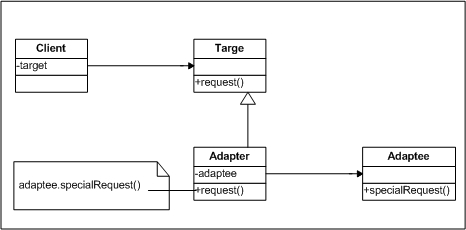
  • Object Adapter pattern: In this pattern, adapter class contain object of class it wraps, i.e., adapter class redirect calls from client class to the wrapped class.
    It uses Composition method for adapting Adaptee and this adaption can be extended to sub-class of Adaptee
    Object Adapter class delegates execution of behaviour to Adaptee class
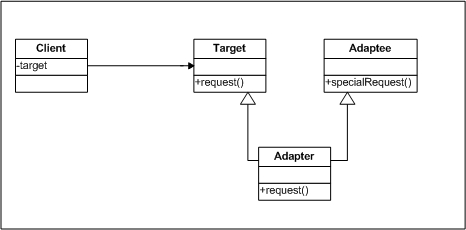
  • Class Adapter pattern: In this pattern, multiple inheritance is used to address the issue. Interface of existing implementation as well as interface of expected implementation is inherited by the adapter class so that it behaves as an expected implementation. This type of implementation is used in situation where existing implementation provide some or all of the services expected but does not use expected interfaces.
    It uses Inheritance method for adapting Adaptee hence Adapter class doesn't requires to reimplement entire Adaptee class, but only needs to override the behaviour of Adaptee class that varies.

Flow of control in Adapter pattern

  • Client makes an request to Adapter class by invoking its method using Target interface.
  • Adapter object translate this request into single or series of method call to Adaptee object.
  • Client receive back the response, without knowing that translation is done by Adapter.

Object Adapter Pattern

Object Adapter Pattern class diagram

Class Adapter Pattern

Class Adapter Pattern class diagram

Note: Adapter pattern is never implemented when designing a new system but with the changing requirements we have deferring interfaces then adapter comes into picture.

Monday, June 21, 2010

Object Pool Pattern

Performance can be sometimes the key issue during the software development and the object creation (class instantiation) is a costly step. While the Prototype pattern helps in improving the performance by cloning the objects, the Object Pool pattern offers a mechanism to reuse objects that are expensive to create.

The Object Pool pattern offers mechanism to reuse/recycle objects that are expensive to create or are no longer need.

Object pool pattern is advisable to use in a situation where several client may need the same stateless object which is expensive to create.

Benefits of using Object Pool pattern are:

  • Pattern can improve performance of application as it help in reducing time for creation of expensive object.
  • Pattern helps in sharing unused object between multiple clients thereby improving memory usage and can result I overall reduction in memory footprint of application.
  • Additional memory management routine will not be required as resource user will acquire and release resource transparently.

The Consequences of this approach include:

  • In concurrent environment acquisition request for the resource needs t be synchronized in order to avoid race condition and possibility of corrupting associated state.
  • In case if resource users are involve in eager acquisition polling approach will fail.

Thursday, June 3, 2010

Eager Initialization Pattern

As name suggests Eager Initialization approach creates/initialize an object with anticipation, regardless of whether or not it will be required in program.

Definition: The Eager Initialization pattern describes how run-time acquisition and initialization of resources can be made predictable and fast by eagerly acquiring and initializing resources before their actual usage.

Eager initialization pattern at first glance seems an un-efficient pattern, but in situation where application is required to be reliable and predictable with no downtime this pattern comes handy. As and when an object/variable is declared or when the object in which it lives is created [declaration or constructor] object/variable is initialized.

Eager initialization approach should only be used

  • When initialization of the instance variable would consume large amount of time and downtime of application is not acceptable.
  • In pooling solution where it will require pre-acquire a number of resources in order to quickly serve first requests.
  • A Hamster application. Like hamster which acquires as many fruits as possible before eating them in its cave, Hamster application will acquires as many resources before it’s actually execute application.

The benefits of this approach include:

  • Increase in predictability of application as user requests for resource acquisition are intercepted and served instantly.
  • Application response time is very low as resources are pre acquired.
  • Assurance of the variables been initialized before they are used.

The Consequences of this approach include:

  • As all the resources are eagerly acquired at the start of the application, the start-up time for the application is longer.
  • Eager Initialization might initialize many objects upfront, which may not be required by system. This may introduce unnecessary exhaustion or overuse of memory resources.
  • Management of eagerly initialized object becomes an important aspect as not all the resources might require immediately in application.